JavaのSpring Bootでフォームの値をsubmitで別画面に渡すサンプルです。
| 確認環境 ・Windows10 ・STS 3.9.6 ・JDK 10.0.2 ・Spring Boot 2.0.5 |
目次
- 環境
- 値を送信する側のファイル(index.html)
- コントローラのクラス(MainController.java)
- 値を受け取る側のファイル(testform.html)
- 画面にJSONを返す(リスト)
- 画面にJSONを返す(マップ)
環境
Thymeleaf(タイムリーフ)を使用しています。
説明用として以下3つのファイルがあります。
1.index.html・・・値を送信する側のファイル。画面でテキストを入力しsubmitを行って値を送信します。
2.MainController.java・・・コントローラです。アクセスするURLに従ってファイルを返します。
3.testform.html・・・値を受け取る側のファイル。index.htmlから値を受け取って画面に表示します。
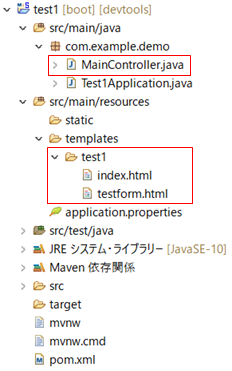
※templatesフォルダの下にtest1フォルダを作成しその中にhtmlファイルがあります。
このサンプルでtest1フォルダ配下に指定のhtmlファイルがない場合は以下のエラーが出ます。
org.thymeleaf.exceptions.TemplateInputException: Error resolving template [test1/index], template might not exist or might not be accessible by any of the configured Template Resolvers
画面表示までの流れ
画面表示までの流れは、以下のとおりです。
1.MainControllerクラスにアクセス→index.htmlをブラウザに返す。
2.index.htmlのformのsubmitでMainControllerクラスにアクセス→testform.htmlをブラウザに返す。
最初の表示は、http://localhost:8080/test1/indexにアクセスします。
値を送信する側のファイル(index.html)
値を送信する側のファイルです。
<!DOCTYPE html>
<html lang="ja">
<head>
<meta charset="utf-8">
<title>submit</title>
</head>
<body >

<form method="get" action="testform">
<input type="text" name="text1">
<input type="submit" value="送信ボタン">
</form>

</body>
</html>
9行目は、methodでpost方式を指定し、actionで送信先(testform)を指定しています。
10行目は、テキストボックスです。画面から文字を入力します。
11行目は、送信ボタンです。ボタンを押すとsubmitします。
画面イメージ
上記コードの画面イメージです。

コントローラのクラス(MainController.java)
コントローラのクラスです。
package com.example.demo;
import org.springframework.stereotype.Controller;
import org.springframework.ui.Model;
import org.springframework.web.bind.annotation.RequestMapping;
import org.springframework.web.bind.annotation.RequestMethod;
import org.springframework.web.bind.annotation.RequestParam;

@Controller
@RequestMapping("/test1")
public class MainController {

    @RequestMapping("/index")
    public String input1() {
        return "test1/index";
    }

	@RequestMapping(value = "testform", method = RequestMethod.GET)
	public String output1(
		@RequestParam(name = "text1") String str1,
		Model model) {
		model.addAttribute("moji1", str1);
		return "test1/testform";
	}
}
14行目は、test1フォルダ配下のindex.htmlを画面に表示します。
19行目の@RequestParamは、リクエストパラメータを受け取ります。
index.htmlで入力された値は、変数str1にセットされます。
21行目は、addAttributeメソッドで変数str1をセットしています。
22行目は、test1フォルダ配下のtestform.htmlを画面に表示します。
画面に表示する
ブラウザに以下のURLを入力するとindex.htmlが画面に表示されます。
http://localhost:8080/test1/index
パラメータをREST形式で受ける場合
上記コードの17行目と19行目を以下のように変更するとURLの一部をパラメータ(REST形式)として受け取れます。
	@RequestMapping(value = "testform/{p1}", method = RequestMethod.GET)
	public String output1(
		@PathVariable("p1") String str1,
		Model model) {
		model.addAttribute("moji1", str1);
		return "test1/testform";
	}
17行目は、URLの箇所をtestform/{p1}にしています。p1がパラメータです。
19行目は、@PathVariableを指定しています。
ブラウザに以下のURLを入力した場合、sssがパラメータになります。画面にはsssと表示されます。
http://localhost:8080/test1/testform/sss
値を受け取る側のファイル(testform.html)
値を受け取る側のファイルです。
<!DOCTYPE html>
<html xmlns:th="http://www.thymeleaf.org">
<head>
<meta charset="utf-8">
<title>submit</title>
</head>
<body >

<p th:text="${moji1}"></p>

</body>
</html>
9行目は、コントローラから渡された値を表示します。
画面にJSONを返す(リスト)
上記のコントローラクラスの戻り値をリストにした場合のサンプルです。
	@RequestMapping(value = "testform", method = RequestMethod.GET)
	@ResponseBody
	public List<String> output1(
			@RequestParam(name = "text1") String str1) {
			List<String> list1 = new ArrayList<>();
			list1.add("赤");
			list1.add("黄");
			list1.add("青");
			return list1;
	}
25行目は、@ResponseBodyアノテーションを追加しています。
32行目は、リストを返しています。クラスのオブジェクトを返すとJSON形式の戻り値になります。
画面には、以下のようなJSONが表示されます。
["赤","黄","青"]
画面にJSONを返す(マップ)
上記のコントローラクラスの戻り値をマップにした場合のサンプルです。
	@RequestMapping(value = "testform", method = RequestMethod.GET)
	@ResponseBody
	public Map<String,String> output1(
			@RequestParam(name = "text1") String str1) {
			Map<String,String> map1 = new HashMap<>();
			map1.put("a", "赤");
			map1.put("b", "黄");
			map1.put("c", "青");
			return map1;
	}
25行目は、@ResponseBodyアノテーションを追加しています。
32行目は、マップを返しています。クラスのオブジェクトを返すとJSON形式の戻り値になります。
画面には、以下のようなJSONが表示されます。
{"a":"赤","b":"黄","c":"青"}
関連の記事
Java STS(Spring Tool Suite)をインストールする手順
Java Spring Bootでhello worldを表示するサンプル
Java Spring Boot MySQLに接続してselectするサンプル(JPA)
Java Spring Boot DI(依存性の注入)のサンプル
Java Spring Boot AOPのサンプル
Java Spring Boot JSONの送信と受信のサンプル