またもや「Excel VBAと関係ねぇじゃねーか!」と言われそうですが、今回はMS-DOSコマンドの標準出力を変数に取得する方法を解説します。これはもう、Excelとは関係ないVB系のネタなんですね。ただ実行環境がExcelってだけで(^^; ま、いーや書いちゃえ。MS-DOSって何のことだかわからない人は、自分で調べてください(^^; なお、ここではWindows XP Home Editionを例に解説します。
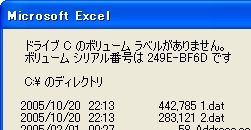
Sub Sample1()
    Dim WSH, wExec, sCmd As String, Result As String
    Set WSH = CreateObject("WScript.Shell")         ''(1)
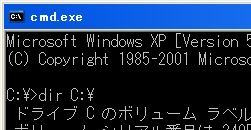
    sCmd = "dir C:\"                                ''(2)
    Set wExec = WSH.Exec("%ComSpec% /c " & sCmd)    ''(3)
    Do While wExec.Status = 0                       ''(4)
        DoEvents
    Loop
    Result = wExec.StdOut.ReadAll                   ''(5)
    MsgBox Result
    Set wExec = Nothing
    Set WSH = Nothing
End Sub
Sub Sample2()
    Dim WSH, wExec, sCmd As String, Result As String, tmp, i As Long
    Set WSH = CreateObject("WScript.Shell")
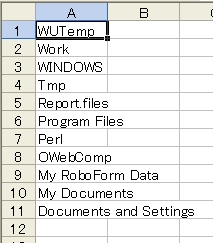
    sCmd = "dir C:\ /b /aD-H /o-N"
    Set wExec = WSH.Exec("%ComSpec% /c " & sCmd)
    Do While wExec.Status = 0
        DoEvents
    Loop
    Result = wExec.StdOut.ReadAll
    tmp = Split(Result, vbCrLf)
    For i = 0 To UBound(tmp)
        Cells(i + 1, 1) = tmp(i)
    Next i
    Set wExec = Nothing
    Set WSH = Nothing
End Sub
Sub Sample3()
    Dim WSH, wExec, sCmd As String, Result As String, tmp, buf As String, i As Long
    Set WSH = CreateObject("WScript.Shell")
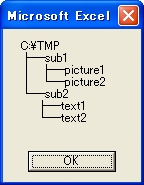
    sCmd = "tree C:\tmp"
    Set wExec = WSH.Exec("%ComSpec% /c " & sCmd)
    Do While wExec.Status = 0
        DoEvents
    Loop
    Result = wExec.StdOut.ReadAll
    tmp = Split(Result, vbCrLf)
    For i = 2 To UBound(tmp)        ''3行目以降を変数に格納します
        buf = buf & tmp(i) & vbCrLf
    Next i
    MsgBox buf
    Set wExec = Nothing
    Set WSH = Nothing
End Sub
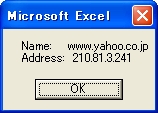
次のコードは、DNSサーバーでwww.yahoo.co.jpのIPアドレスを調べます。
Sub Sample4()
    Dim WSH, wExec, sCmd As String, Result As String, tmp, buf As String, i As Long
    Set WSH = CreateObject("WScript.Shell")
    sCmd = "nslookup www.yahoo.co.jp"
    Set wExec = WSH.Exec("%ComSpec% /c " & sCmd)
    Do While wExec.Status = 0
        DoEvents
    Loop
    Result = wExec.StdOut.ReadAll
    tmp = Split(Result, vbCrLf)
    For i = 0 To UBound(tmp)
        If Left(tmp(i), 5) = "Name:" Then
            buf = tmp(i) & vbCrLf & tmp(i + 1)
        End If
    Next i
    MsgBox buf
    Set wExec = Nothing
    Set WSH = Nothing
End Sub