
- Home ›
- MySQLの使い方 ›
- MySQLコマンドラインツールの使い方 ›
- HERE
オプションの指定
MySQLコマンドラインツールは起動する時の書式をもう一度確認すると次のようにになります。
mysql [OPTIONS] [database]
このページでは指定可能なオプションについて確認していきます。
まずはMySQLコマンドラインツールのヘルプを表示させてみます。コマンドプロンプトを起動し、次のように実行してください。
mysql -?
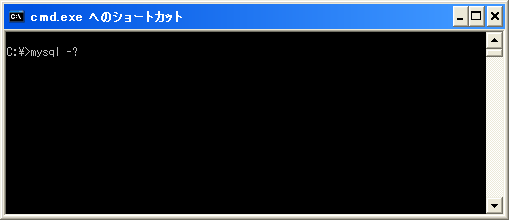
次のように表示されます。(分かりやすいように出力された内容をテーブルとして表示しています)。
指定可能なオプション:
| OPTIONS | 意味 |
|---|---|
| -?, --help | Display this help and exit. |
| -I, --help | Synonym for -? |
| --auto-rehash | Enable automatic rehashing. One doesn't need to use 'rehash' to get table and field completion, but startup and reconnecting may take a longer time. Disable with --disable-auto-rehash. |
| -A, --no-auto-rehash | No automatic rehashing. One has to use 'rehash' to get table and field completion. This gives a quicker start of mysql and disables rehashing on reconnect. WARNING: options deprecated; use --disable-auto-rehash instead. |
| -B, --batch | Don't use history file. Disable interactive behavior. (Enables --silent) |
| --character-sets-dir=name | Directory where character sets are. |
| --column-type-info | Display column type information. |
| -c, --comments | Preserve comments. Send comments to the server. The default is --skip-comments (discard comments), enable with --comments |
| -C, --compress | Use compression in server/client protocol. |
| -#, --debug[=#] | This is a non-debug version. Catch this and exit |
| --debug-check | Check memory and open file usage at exit. |
| -T, --debug-info | Print some debug info at exit. |
| -D, --database=name | Database to use. |
| --default-character-set=name | Set the default character set. |
| --delimiter=name | Delimiter to be used. |
| -e, --execute=name | Execute command and quit. (Disables --force and history file) |
| -E, --vertical | Print the output of a query (rows) vertically. |
| -f, --force | Continue even if we get an sql error. |
| -G, --named-commands | Enable named commands. Named commands mean this program's internal commands; see mysql> help . When enabled, the named commands can be used from any line of the query, otherwise only from the first line, before an enter. Disable with --disable-named-commands. This option is disabled by default. |
| -g, --no-named-commands | Named commands are disabled. Use ¥* form only, or use named commands only in the beginning of a line ending with a semicolon (;) Since version 10.9 the client now starts with this option ENABLED by default! Disable with '-G'. Long format commands still work from the first line. WARNING: option deprecated; use --disable-named-commands instead. |
| -i, --ignore-spaces | Ignore space after function names. |
| --local-infile | Enable/disable LOAD DATA LOCAL INFILE. |
| -b, --no-beep | Turn off beep on error. |
| -h, --host=name | Connect to host. |
| -H, --html | Produce HTML output. |
| -X, --xml | Produce XML output |
| --line-numbers | Write line numbers for errors. |
| -L, --skip-line-numbers | Don't write line number for errors. WARNING: -L is deprecated, use long version of this option instead. |
| -n, --unbuffered | Flush buffer after each query. |
| --column-names | Write column names in results. |
| -N, --skip-column-names | Don't write column names in results. WARNING: -N is deprecated, use long version of this options instead. |
| -O, --set-variable=name | Change the value of a variable. Please note that this option is deprecated; you can set variables directly with --variable-name=value. |
| --sigint-ignore | Ignore SIGINT (CTRL-C) |
| -o, --one-database | Only update the default database. This is useful for skipping updates to other database in the update log. |
| -p, --password[=name] | Password to use when connecting to server. If password is not given it's asked from the tty. |
| -W, --pipe | Use named pipes to connect to server. |
| -P, --port=# | Port number to use for connection or 0 for default to, in order of preference, my.cnf, $MYSQL_TCP_PORT, /etc/services, built-in default (3306). |
| --prompt=name | Set the mysql prompt to this value. |
| --protocol=name | The protocol of connection (tcp,socket,pipe,memory). |
| -q, --quick | Don't cache result, print it row by row. This may slow down the server if the output is suspended. Doesn't use history file. |
| -r, --raw | Write fields without conversion. Used with --batch. |
| --reconnect | Reconnect if the connection is lost. Disable with --disable-reconnect. This option is enabled by default. |
| -s, --silent | Be more silent. Print results with a tab as separator, each row on new line. |
| --shared-memory-base-name=name | Base name of shared memory. |
| -S, --socket=name | Socket file to use for connection. |
| --ssl | Enable SSL for connection (automatically enabled with other flags). Disable with --skip-ssl. |
| --ssl-ca=name | CA file in PEM format (check OpenSSL docs, implies --ssl). |
| --ssl-capath=name | CA directory (check OpenSSL docs, implies --ssl). |
| --ssl-cert=name | X509 cert in PEM format (implies --ssl). |
| --ssl-cipher=name | SSL cipher to use (implies --ssl). |
| --ssl-key=name | X509 key in PEM format (implies --ssl). |
| --ssl-verify-server-cert | Verify server's "Common Name" in its cert against hostname used when connecting. This option is disabled by default. |
| -t, --table | Output in table format. |
| --tee=name | Append everything into outfile. See interactive help (¥h) also. Does not work in batch mode. Disable with --disable-tee. This option is disabled by default. |
| --no-tee | Disable outfile. See interactive help (¥h) also. WARNING: option deprecated; use --disable-tee instead |
| -u, --user=name | User for login if not current user. |
| -U, --safe-updates | Only allow UPDATE and DELETE that uses keys. |
| -U, --i-am-a-dummy | Synonym for option --safe-updates, -U. |
| -v, --verbose | Write more. (-v -v -v gives the table output format). |
| -V, --version | Output version information and exit. |
| -w, --wait | Wait and retry if connection is down. |
| --connect_timeout=# | Number of seconds before connection timeout. |
| --max_allowed_packet=# | Max packet length to send to, or receive from server |
| --net_buffer_length=# | Buffer for TCP/IP and socket communication |
| --select_limit=# | Automatic limit for SELECT when using --safe-updates |
| --max_join_size=# | Automatic limit for rows in a join when using --safe-updates |
| --secure-auth | Refuse client connecting to server if it uses old (pre-4.1.1) protocol |
| --server-arg=name | Send embedded server this as a parameter. |
| --show-warnings | Show warnings after every statement. |
| aaa | bbb |
現在の設定値:
| Variables | Value |
|---|---|
| auto-rehash | TRUE |
| character-sets-dir | (No default value) |
| column-type-info | FALSE |
| comments | FALSE |
| compress | FALSE |
| debug-check | FALSE |
| debug-info | FALSE |
| database | (No default value) |
| default-character-set | utf8 |
| delimiter | ; |
| vertical | FALSE |
| force | FALSE |
| named-commands | FALSE |
| ignore-spaces | FALSE |
| local-infile | FALSE |
| no-beep | FALSE |
| host | (No default value) |
| html | FALSE |
| xml | FALSE |
| line-numbers | TRUE |
| unbuffered | FALSE |
| column-names | TRUE |
| sigint-ignore | FALSE |
| port | 3306 |
| prompt | mysql> |
| quick | FALSE |
| raw | FALSE |
| reconnect | TRUE |
| shared-memory-base-name | (No default value) |
| socket | (No default value) |
| ssl | FALSE |
| ssl-ca | (No default value) |
| ssl-capath | (No default value) |
| ssl-cert | (No default value) |
| ssl-cipher | (No default value) |
| ssl-key | (No default value) |
| ssl-verify-server-cert | FALSE |
| table | FALSE |
| user | (No default value) |
| safe-updates | FALSE |
| i-am-a-dummy | FALSE |
| connect_timeout | 0 |
| max_allowed_packet | 16777216 |
| net_buffer_length | 16384 |
| select_limit | 1000 |
| max_join_size | 1000000 |
| secure-auth | FALSE |
| show-warnings | FALSE |
非常に長いのですが、前半部分が指定可能なオプション、後半部分が現在設定されている値を表示しています。
オプションの指定は二通りの指定方法があるものもあります。例えばバージョンを表示するためのオプションは次のように記載されています。
-V, --version Output version information and exit
このように記載されている場合は次のようにどちらの指定方法を使っても同じです。
mysql -V
mysql --version
全てのオプションを理解しておく必要はありません。必要に応じて設定可能なものが無いかどうかを調べるようにして下さい。
MySQLコマンドラインツールの各値にはデフォルトの値が用意されていますが、一部の値は設定ファイルを読み込んでデフォルトの値として設定しています。設定ファイルは次のファイルを順に読み込んで値を設定していきます。
C:¥WINDOWS¥my.ini
C:¥WINDOWS¥my.cnf
C:¥my.ini
C:¥my.cnf
d:¥MySQL¥MySQL Server 5.1¥my.ini
d:¥MySQL¥MySQL Server 5.1¥my.cnf
存在しないファイルもあります。実際私の環境では「d:¥MySQL¥MySQL Server 5.1¥my.ini」しかありませんので、実質的にこのファイルを読み込んでデフォルトの値として設定を行っています。(このファイルはMySQLサーバ側でも読み込んでいるものです)。
ファイルから読み込んで設定している値をは次のようにして確認することができます。
mysql --print-defaults
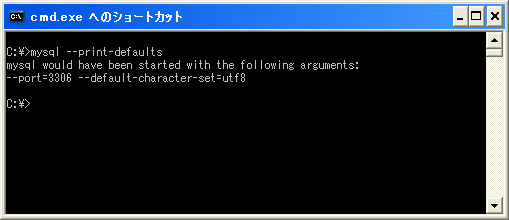
また次のようにして読み込む設定ファイルを指定することもできます。
mysql --defaults-file="d:¥MySQL¥MySQL Server 5.1¥my.ini"
※パスに空白が含まれる場合は全体をダブルクオーテーションで囲って指定して下さい。
では次のページでMySQLサーバに接続するためのユーザー名とパスワードを指定するためのオプションについて確認します。
( Written by Tatsuo Ikura )
 DBOnline