3のプログラムでは、キャラクタの矩形を画面(バック・サーフェイス)からはみ出した部分に描画を行うとBltFast関数がエラーになり、描画が失敗する。また、画面内の決められた範囲内しか移動できないようにしたい場合もある。では、はみ出さないようにするにはどうしたら良いのだろうか。
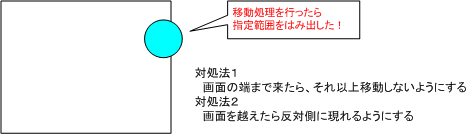
3のプログラムでは、キャラクタの矩形を画面(バック・サーフェイス)からはみ出した部分に描画を行うとBltFast関数がエラーになり、描画が失敗する。また、画面内の決められた範囲内しか移動できないようにしたい場合もある。では、はみ出さないようにするにはどうしたら良いのだろうか。
《サンプルプログラム》
#define SCREEN_WIDTH 640 #define SCREEN_HEIGHT 480 ・ ・ // グローバル変数の宣言 RECT winRect = {0, 0, SCREEN_WIDTH, SCREEN_HEIGHT}; // 画面の矩形(絶対に変わらないのでここで初期化) RECT charRect; // キャラクタ画像矩形 int x, y; // キャラクタ表示座標 int charWidth, charHeight; // キャラクタの幅、高さ int move_x, move_y; // キャラクタの移動量 ・ ・ // 初期化 void GameInit(void) { // キャラクタ用変数 SetRect(&charRect, 0, 50, 48, 98); // キャラクタ画像矩形 charWidth = charRect.right - charRect.left; // キャラクタの幅 charHeight = charRect.bottom - charRect.top; // キャラクタの高さ move_x = 3; // 移動量の初期値 move_y = 3; // 移動量の初期値 ・ ・ } // メイン処理 void GameFrame(void) { // 背景描画 ・ ・ // キャラクタ描画 hRet = g_pDDSBack->BltFast((DWORD)x,(DWORD)y, g_pDDSGame, &AngelRect, DDBLTFAST_SRCCOLORKEY); if (hRet != DD_OK) // 描画に失敗したら関数を抜ける(これ以降の処理は行わない) return; ・ ・ // 移動処理 if (KeyTbl[VK_LEFT] & 0x80) { x -= move_x;if (x < winRect.left) x = winRect.left;} if (KeyTbl[VK_RIGHT] & 0x80) x += move_x;if (winRect.right < (x + charWidth)) x = winRect.right - charWidth;} if (KeyTbl[VK_UP] & 0x80) y -= move_y;if (y < winRect.top) y = winRect.top;} if (KeyTbl[VK_DOWN] & 0x80) y += move_y;if (winRect.bottom < (y + charHeight)) y = winRect.bottom - charHeight;} ・ ・
- 移動量の大きさによって、画面の端ぴったりに来るとは限らないので、はみ出た場合は修正する。
- 端のほうまで来たらキャラクタが消えてしまう場合、BltFastが失敗、つまり
移動処理にバグがあることが分かる。- 上記サンプルでは
移動量を加えてから判定を行っているが、移動できるかどうかを判定してから移動量を加える方法もある。
《サンプルプログラム》
// 移動処理 if (KeyTbl[VK_LEFT] & 0x80) { x -= move_x; if (x < winRect.left)x = winRect.right - charWidth;} if (KeyTbl[VK_RIGHT] & 0x80) { x += move_x; if (winRect.right < (x + charWidth))x = winRect.left;} if (KeyTbl[VK_UP] & 0x80) { y -= move_y; if (y < winRect.top)y = winRect.bottom - charHeight;} if (KeyTbl[VK_DOWN] & 0x80) { y += move_y; if (winRect.bottom < (y - charHeight))y = winRect.top;} ・ ・
- はみ出したら反対側の座標をセットする。
- 端のほうまで来たらキャラクタが消えてしまう場合、BltFastが失敗、つまり
移動処理にバグがあることが分かる。- 上記サンプルでは
移動量を加えてから判定を行っているが、移動できるかどうかを判定してから移動量を加える方法もある。
画面全体を基準にして判定ができるなら、画面内の
指定した範囲内でしか動けないようにするのも簡単である。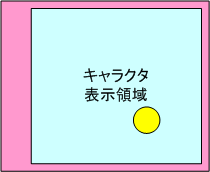
《サンプルプログラム》
#define SCREEN_WITDH 640 #define SCREEN_HEIGHT 480 ・ ・ // グローバル変数の宣言 RECT winRect = {0, 0, SCREEN_WIDTH, SCREEN_HEIGHT}; // 画面の矩形(絶対に変わらないのでここで初期化)RECT gameRect = {50, 15, 630, 465}; // キャラクタ描画領域の矩形(絶対に変わらないのでここで初期化)・ ・ // メイン処理 void GameFrame(void) { ・ ・ // 移動処理 if (KeyTbl[VK_LEFT] & 0x80) { x -= move_x; if (x <gameRect.left) x =gameRect.left; } if (KeyTbl[VK_RIGHT] & 0x80) { x += move_x; if (gameRect.right < (x + charWidth)) x =winRect.right - charWidth; } if (KeyTbl[VK_UP] & 0x80) { y -= move_y; if (y <gameRect.top) y =gameRect.top; } if (KeyTbl[VK_DOWN] & 0x80) { y += move_y; if (gameRect.bottom < (y + charHeight)) y =gameRect.bottom - charHeight; } ・ ・
- 比較対照の矩形を変えるだけである!