※スタイルシート未対応ブラウザではレイアウトを正確に再現できません。
< [modosusu] > Color magazine monochrome light and shade font predetermined, Gothic Ming-style type longhand size Konaka large standard
Installation of Visual C++ 2008 Express Edition
- ..clause 1..: Download
- ..clause 2..: Installation
- ..clause 3..: How to make program
- ..clause 4..: How to move program
- ..clause 5..: Error message
- ..clause 6..: Directions
[1] Download Download the compiler to the start.
The development setting Visual C++ 2008 Express Edition can be downloaded from the following sites.
Visual C++ 2008 Express Edition http://www.microsoft.com/japan/msdn/vstudio/Express/
The Web installation at the center of the page It is possible to download it by clicking (download).
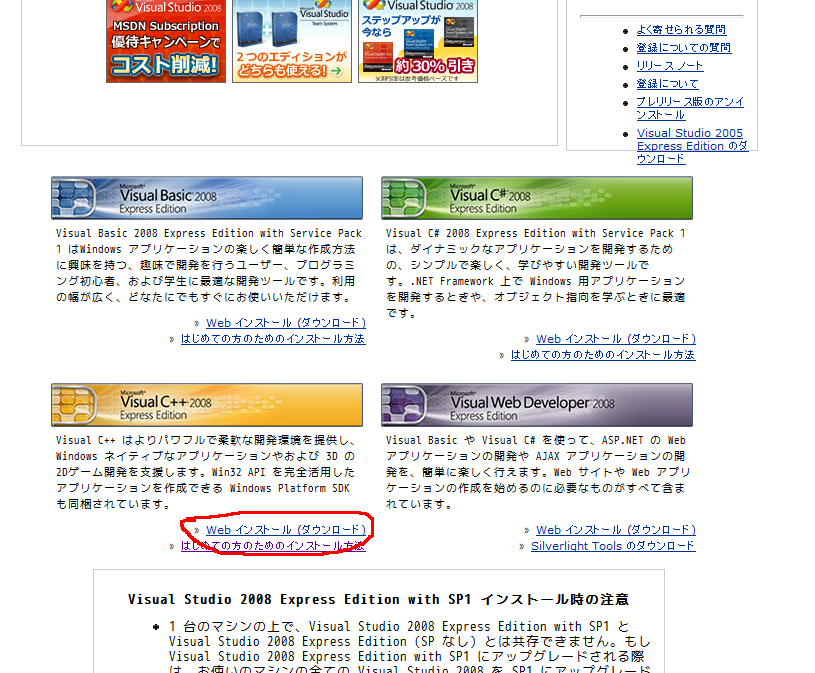
The size of the file Download ends at once because it is about 3MB.
The left the center under without fail Download Visual C++ 2008 Express Edition.
Then, there is no other link for C language.
All user's registrations and questionnaires can be comfortably installed because it is unnecessary.
It returns to contents.
[2] Installation Next, install Visual C++ 2008 Express Edition.
It downloaded it The installation only of double-clicking vcsetup.exe is begun.
Install this installer as notes while downloading a necessary file by way of the Internet.
Therefore, it is necessary to hook up to the Internet while installing it.
Finally, install the file of several 100MB moreover.
Only install it following the wizard after it starts.
Though you may remove the item without the necessity such as "SQL Server"
Next [hewo] single-mindedly completes the installation without trouble if it keeps pushing if it doesn't understand well.
It returns to contents.
[ The mount is done virtual ].
Install software that does the same function as CD-ROM drive to the computer virtual with the mount.
It is a method of handling the ISO file etc. with the software as much as genuine CD.
First of all, download software that does the same function as CD-ROM drive from the following site.
DAEMON Tools 3.47 http://www.daemon-tools.cc/dtcc/download.php?mode=ViewCategory&catid=5
Because the spyware is included in the latest version though there is the latest version, too Download 3.47.
When the downloaded file is executed, the installation is begun. Advance, and reactivate according to the instruction.
Reactivate..lower right of the screen..new..center..icon..made..think.
Click the icon, and from the menu Because the file selection dialog is [deru] when Device 0 is clicked
Then, select the ISO file downloaded ahead. The installation is automatically begun.
By the way, the file of CD can be taken out of the ISO file by using WinRAR according to the same points as defrosting the data compressed file.
Obey instructions after it hooks up to the Internet and install it when the installation starts.
The installation of Visual C++ 2005 Express Edition ends by this.
[3] How to make program Next, it explains the procedure for making the program.
Start menu-> program > Visual C++ 2005 Express Edition - > Start with Visual C++ 2005 Express Edition.
Next, file > of the menu new make-> Select it with the project.
Because the screen where the kind of the project is selected is displayed
Select left Win32, and select right Win32 [konso-ruapurike-shon].
And, input a suitable name (test etc.) to the part of the solution name, and push OK.
Then, because a set wizard is displayed, next [hewo] displays a set screen pushing.
Remove the check on the B precompile settlement header from among that", and push OK.
Then, make it by driving the program there because the text editor screen opens.
Erase all the confused people though some program has been written since beginning.
The person who understands the meaning begins to write and doesn't care about the program as it is.
The operation is roughly the same as a general text editor.
Moreover, because a C language instruction etc. are classified and displayed, it is comprehensible.
Let's make the program by way of experiment here. Drive it as shown in the following content.
Drive by normal-width, and use all TAB keys for the part that swerves to the right.
It fails even if it operates by the following clause if it copies it from a browser.
 #include <stdio.h> int main (void)
{
printf("Hello World\n");
return 0;
}
 #include  <stdio.h> int  main  (void)
{
	printf("Hello World\n");
	return  0;
}
File > of the menu Everything can be preserved and the program be preserved by choosing preserving.
It returns to contents.
[4] How to move program Next, it explains the procedure for moving the program.
Debugging > of the menu Execute the program by beginning without debugging.
A black screen is displayed when executing it and the result is displayed in that.
Moreover, when the mistake is found, the error message is displayed under the screen in Japanese.
Let's move the program by way of experiment here. When you make the program as shown in the preceding clause
Debugging > of the menu Push beginning without debugging.
If it succeeds

Hello World
It drinks and there must be a character.
The character displayed by another is a character displayed by the convenience of the compiler. Disregard it.
It returns to contents.
[5] Error message In a lot of compilers, display the error when the mistake is found in the program.
The error is classified into two kinds (the error and warning).
It is not operated as it is with the error by making a mistake in a clear grammar.
When an improper expression is used, it is displayed that it warns though it is possible to scooch.
It can be expected that the error and warning will push the tab of build under the left of the screen.
It is time when the next in there is no error both not warning at all.
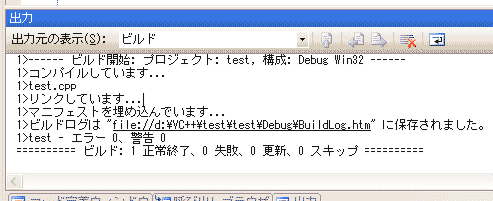
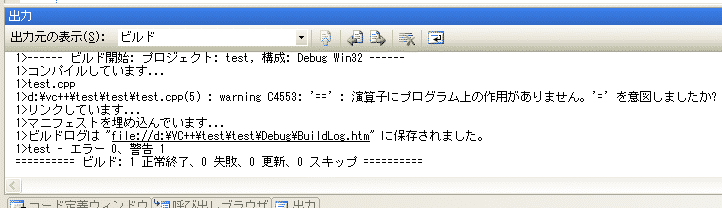
It is time when the under is displayed warning. It is displayed that warning is one.
Correct it as much as possible though it is possible to execute as it is.
It is time when the under is displayed the error. It is displayed that the error is one.
It is not, and correct the error though it will do very the way things are going.
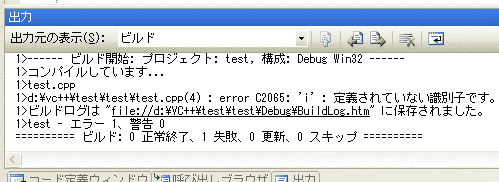
In this example, it is understood that there is an error called an identifier not defined in "I of the fourth line of the test.cpp file".
I think that I serve as a reference though there is not necessarily cause of the error in a pertinent line.
Occasionally, the error and warning might be hugely displayed.
The error occurs in the chain in this because of one error.
In this case, if the first error is corrected most, other errors might become it not is, too.
It returns to contents.
[6] Directions There are no such notes for Visual C++ 2005 Express Edition.
However, this compiler is originally a compiler of C++ as shown by the name.
Note that the function that is not the specification of C language can be used.
It returns to contents.
< - It is advanced -> | in | head that returns to returning next |.